Shopify VS WooCommerce For Beginners: Which Ecommerce Platform Is Right for You?
Shopify VS WooCommerce For Beginners is one of the most common comparisons for anyone looking to start an online store. Both platforms are powerful ecommerce solutions that allow you to sell products online, manage inventory, accept payments, and grow your business. However, they take very different approaches when it comes to setup, customization, pricing, and ease of use.
Shopify is an all-in-one hosted platform designed to make ecommerce simple, while WooCommerce is a flexible WordPress plugin that gives users complete control over their online stores. Choosing the right platform can have a significant impact on your store’s success, especially if you’re new to ecommerce.
In this guide, we’ll compare Shopify and WooCommerce across key areas such as ease of use, pricing, design options, ecommerce features, SEO, security, scalability, customer support, and more. By the end, you’ll have a clear understanding of the strengths and weaknesses of each platform and be able to decide which one is the best fit for your business goals.
Whether you’re launching your first online store or looking for the most beginner-friendly ecommerce solution, this detailed comparison will help you make an informed decision.
Table of Contents
Ease of Setup
When comparing Shopify vs WooCommerce for Beginners, ease of setup is one of the most important factors to consider. If you’re launching your first online store, you want a platform that gets you up and running quickly without requiring technical skills.
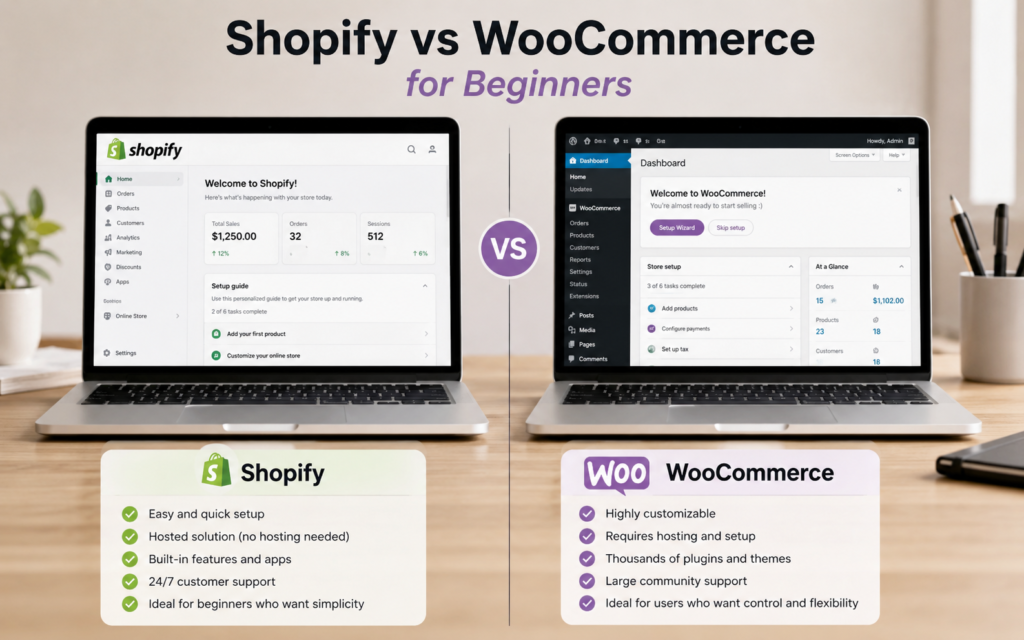
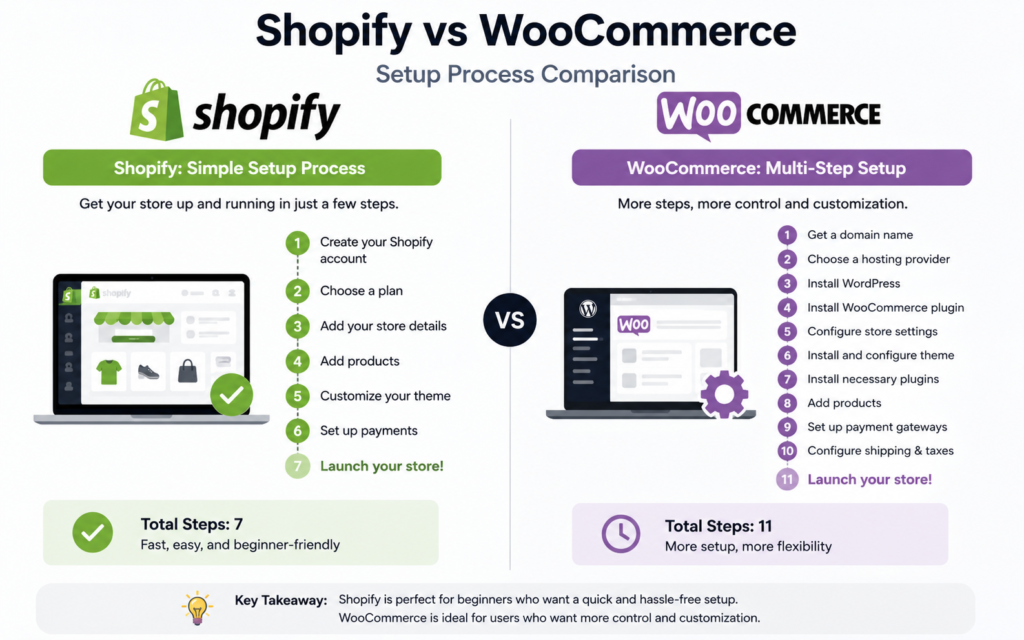
Shopify is designed specifically for beginners. After signing up, Shopify guides you through the entire setup process, including choosing a theme, adding products, configuring payment methods, and setting up shipping options. Since Shopify is a fully hosted platform, you don’t need to worry about web hosting, software installation, security updates, or backups. Everything is managed for you in one place.
WooCommerce, on the other hand, requires a few additional steps before you can start selling. Because WooCommerce is a WordPress plugin, you’ll first need to purchase web hosting, install WordPress, and then install the WooCommerce plugin. Depending on your hosting provider, some of these steps may be simplified, but beginners will still face a steeper learning curve compared to Shopify.
Another advantage of Shopify is that all essential ecommerce features are included out of the box. With WooCommerce, you may need to install additional plugins to add features such as advanced shipping options, payment gateways, security tools, or marketing functionality.
For beginners who want the fastest and simplest way to launch an online store, Shopify is the clear winner. Its guided setup process and all-in-one approach make it much easier to start selling online without technical knowledge.Suggested Images for This Section
Ease of Use
Shopify VS WooCommerce For Beginners ease of use, ease of use is one of the most important factors to consider. Most beginners want a platform that is simple to set up, easy to manage, and doesn’t require technical skills. This is very important when comparing Shopify VS WooCommerce For Beginners
Shopify: Designed for Simplicity
Shopify is built specifically for users who want an easy, all-in-one solution. After signing up, you can choose a theme, add products, set up payment methods, and launch your store without dealing with web hosting, security settings, or software installations.
The Shopify dashboard is clean and beginner-friendly, making it easy to manage products, orders, customers, and marketing tools from one place. Most tasks can be completed with just a few clicks, which makes Shopify an excellent option for first-time online store owners.
Pros of Shopify for beginners:
- No coding knowledge required
- Quick and straightforward setup process
- Hosting and security included
- User-friendly dashboard
- 24/7 customer support
WooCommerce: More Flexible but Requires More Setup
WooCommerce is a WordPress plugin that turns your website into an online store. While it offers greater customization and flexibility, it comes with a steeper learning curve compared to Shopify.
Before you can start selling, you’ll need to purchase hosting, install WordPress, set up WooCommerce, configure security settings, and choose additional plugins. Although many hosting companies offer one-click installations, the overall setup process is still more involved.
For users who are already familiar with WordPress, WooCommerce may feel comfortable. However, complete beginners may find the number of settings and customization options overwhelming at first.
Pros of WooCommerce for beginners:
- Full control over your website
- Highly customizable
- Large library of plugins and themes
- No platform limitations
Cons for beginners:
- More technical setup required
- Responsible for updates and maintenance
- Security and backups must be managed separately
- Learning curve is higher
Which Platform Is Easier for Beginners?
In the Shopify VS WooCommerce For Beginners debate, Shopify is the clear winner when it comes to ease of use. Its fully hosted approach eliminates many technical tasks, allowing beginners to focus on building and growing their business.
WooCommerce offers more flexibility and control, but it requires a greater investment of time and effort to learn and manage. If your priority is getting an online store up and running quickly with minimal technical work, Shopify is generally the better choice.
Shopify provides the smoother and more beginner-friendly experience, while WooCommerce is better suited to those who want maximum customization and don’t mind a learning curve.
Pricing and Costs
When comparing Shopify VS WooCommerce For Beginners, pricing is often a major deciding factor. While both platforms can help you build a successful online store, their cost structures are very different.
Shopify Pricing
Shopify operates on a subscription-based model. This means you’ll pay a fixed monthly fee that includes hosting, security, software updates, and customer support.
Shopify offers several pricing plans, allowing businesses to choose one that fits their needs and budget. While the monthly cost is predictable, additional expenses can arise if you purchase premium themes, paid apps, or use third-party payment gateways.
For beginners, the biggest advantage is that most essential features are included in one package, making it easier to estimate your monthly expenses. Pay close attention to pricing when comparing Shopify VS WooCommerce For Beginners
Typical Shopify costs include:
- Monthly subscription fee
- Premium themes (optional)
- Paid apps and integrations (optional)
- Transaction fees in certain cases
WooCommerce Pricing
WooCommerce itself is free to install and use. However, running a WooCommerce store involves several additional costs that beginners should be aware of.
Since WooCommerce is self-hosted, you’ll need to pay for web hosting, a domain name, SSL certificate (if not included by your host), and any premium plugins or themes you choose to use.
The total cost can vary significantly depending on your hosting provider and the features you need. Some beginners may spend less than they would with Shopify, while others may end up spending more as their store grows.
Typical WooCommerce costs include:
- Web hosting
- Domain name
- Premium themes (optional)
- Premium plugins (optional)
- Security and backup solutions
- Developer costs (if needed)
Which Platform Offers Better Value?
In the Shopify VS WooCommerce For Beginners comparison, the better value depends on your priorities.
While Shopify VS WooCommerce For Beginners both offer great value, Shopify offers predictable pricing and includes most of the technical essentials in one package. This makes budgeting easier and reduces the risk of unexpected costs.
WooCommerce provides more flexibility and can be more affordable for smaller stores. However, costs can increase over time as you add premium plugins, upgrade hosting, or hire professional help for customization.
For beginners who want simplicity and clear monthly costs, Shopify is often the easier option. For those who want full control and are comfortable managing additional expenses, WooCommerce can offer excellent long-term value.
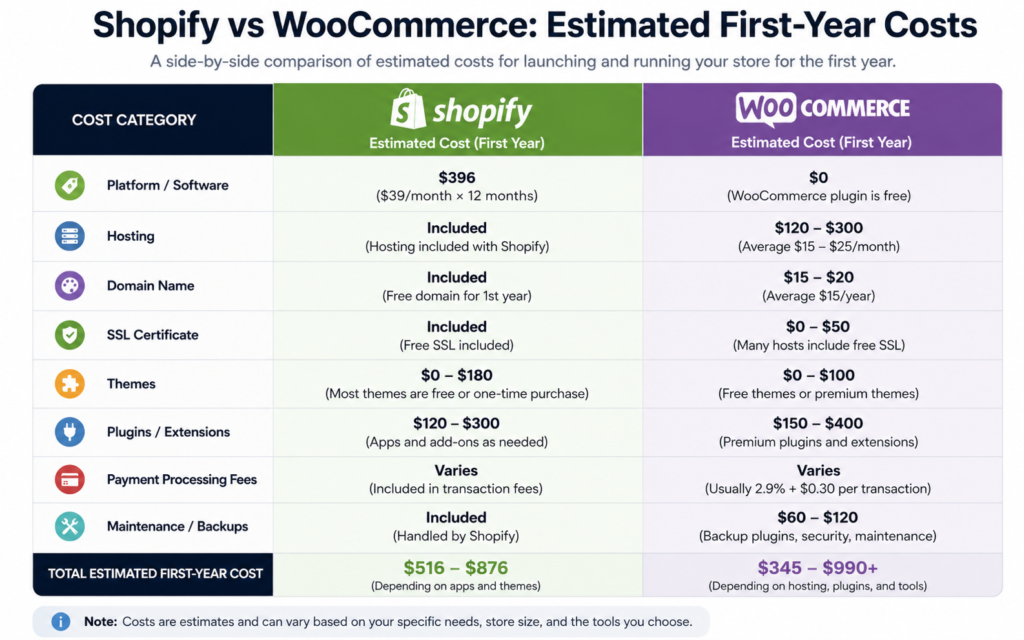
When evaluating Shopify VS WooCommerce For Beginners, Shopify provides a more straightforward pricing model with fewer technical expenses to manage. WooCommerce can be cheaper initially, but the total cost depends heavily on your hosting, plugins, and customization needs. Understanding these costs upfront will help you choose the platform that best fits your budget and business goals.
Design and Themes
Customization and Flexibility
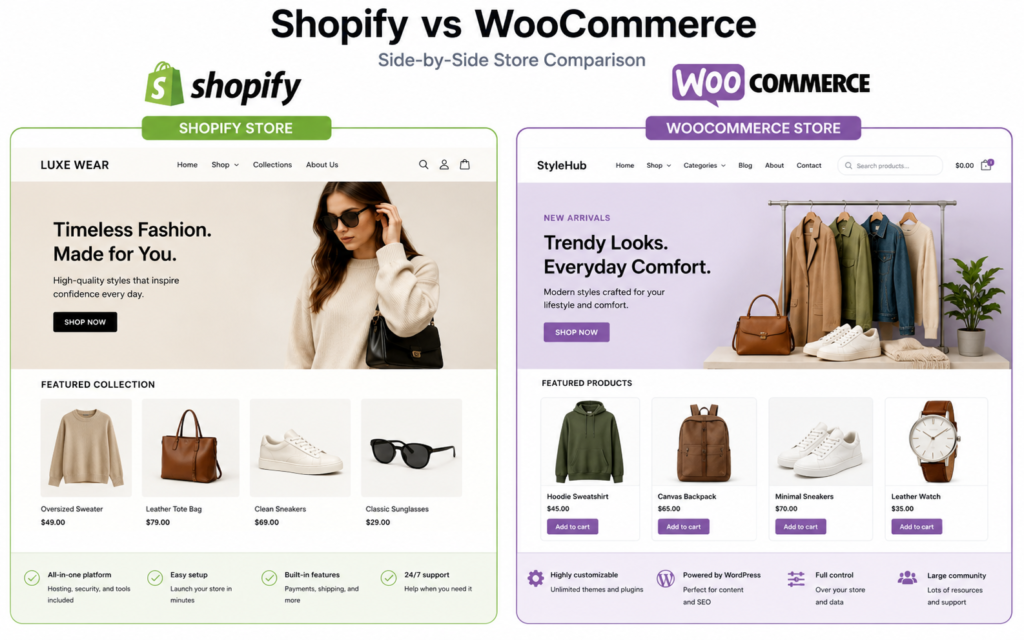
When comparing Shopify VS WooCommerce For Beginners, design flexibility and theme options are important factors to consider. Your store’s appearance plays a major role in creating a professional first impression and providing a great shopping experience for customers.
Shopify Themes
Shopify offers a collection of professionally designed themes that are optimized for eCommerce. Both free and premium themes are available, making it easy for beginners to create an attractive online store without needing design or coding skills.
The Shopify theme editor uses a simple drag-and-drop interface, allowing you to customize colors, fonts, layouts, and homepage sections with ease. Most themes are mobile-friendly by default, ensuring your store looks great on smartphones, tablets, and desktop devices.
One of Shopify’s biggest advantages is that all themes are designed specifically for online stores, so they typically require minimal setup.
Benefits of Shopify Themes:
- Easy to customize without coding
- Mobile-responsive designs
- Professionally designed templates
- Fast setup process
- Dedicated support for many premium themes
WooCommerce Themes
WooCommerce offers significantly more design flexibility because it runs on WordPress. Store owners can choose from thousands of WordPress themes, including many that are specifically designed for WooCommerce.
This large selection gives users greater creative freedom, but it can also make choosing a theme more difficult. Some themes may require additional customization or plugins to achieve the desired look and functionality.
For beginners who want complete control over their website’s design, WooCommerce provides nearly unlimited customization options. However, achieving advanced designs may require some technical knowledge or the use of page builders such as Elementor.
Benefits of WooCommerce Themes:
- Huge selection of themes
- Extensive customization options
- Full control over website design
- Compatible with popular page builders
- Easier to create unique layouts
Customization and Design Flexibility of Shopify VS WooCommerce For Beginners
In the Shopify VS WooCommerce For Beginners comparison, WooCommerce wins when it comes to customization flexibility. Since it is open-source, users can modify almost every aspect of their website.
Shopify, on the other hand, prioritizes simplicity and consistency. While customization options are available, they are generally more controlled to maintain performance and ease of use.
For most beginners, Shopify provides enough design flexibility to create a professional online store. However, users with specific design requirements may appreciate the greater freedom offered by WooCommerce.
Which Platform Has Better Themes?
When evaluating WooCommerce VS Shopify For Beginners, the best choice depends on your goals.
- Choose Shopify if you want beautiful, ready-to-use themes that are easy to customize and launch quickly.
- Choose WooCommerce if you want maximum creative control and access to thousands of desi
For beginners, Shopify offers a simpler and more streamlined approach to website design, making it easy to build a professional-looking store with minimal effort. WooCommerce provides greater customization potential and a much larger selection of themes, but it may require more time and technical knowledge to achieve the perfect design. For most first-time store owners, Shopify delivers the easier design experience, while WooCommerce is ideal for those who value flexibility and control.
Ecommerce Features
When comparing Shopify VS WooCommerce For Beginners, ecommerce features are one of the most important areas to look at. Both platforms give you the tools needed to sell products online, but they offer those tools in different ways.
Shopify Ecommerce Features
Shopify is built specifically for ecommerce, so many important selling features are included from the start. Beginners can add products, accept payments, manage inventory, create discount codes, and process orders without needing extra setup.
Shopify also includes built-in tools for shipping, abandoned cart recovery, customer management, and basic marketing. This makes it easier for new store owners to start selling quickly without installing multiple plugins.
Key Shopify ecommerce features include:
- Product and inventory management
- Secure checkout
- Multiple payment options
- Discount codes and gift cards
- Abandoned cart recovery
- Shipping tools
- Order management
- Customer accounts
- App integrations for extra features
WooCommerce Ecommerce Features
WooCommerce also provides strong ecommerce features, but many advanced options depend on plugins and extensions. Out of the box, WooCommerce lets you add products, manage orders, accept payments, create coupons, and control shipping settings.
Because WooCommerce runs on WordPress, it is highly flexible. You can add features for subscriptions, memberships, bookings, wholesale pricing, advanced shipping, and more. However, beginners may need more time to choose and configure the right plugins.
Key WooCommerce ecommerce features include:
- Product and inventory management
- Flexible product types
- Payment gateway options
- Coupon creation
- Shipping zones and rates
- Order management
- Customer accounts
- Plugin-based feature expansion
- Full control over store settings
Apps and Extensions for Shopify VS WooCommerce For Beginners
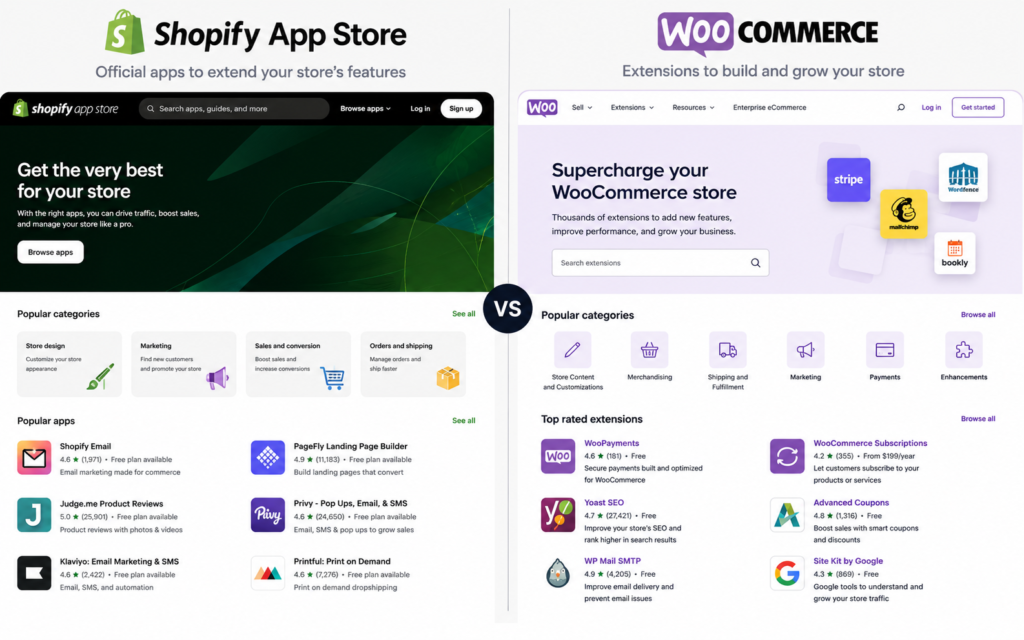
In the Shopify VS WooCommerce For Beginners comparison, both platforms allow you to expand your store with additional tools.
Shopify uses the Shopify App Store, where you can install apps for reviews, email marketing, upsells, dropshipping, subscriptions, and analytics. These apps are usually easy to install and beginner-friendly.
WooCommerce uses WordPress plugins and WooCommerce extensions. This gives you more options and control, but it can also make setup more complicated. Some plugins may conflict with each other or require manual configuration.
Which Platform Has Better Ecommerce Features?
For beginners, Shopify offers a smoother experience because many ecommerce tools are already built in and easy to use. It is designed to help users launch and manage an online store with fewer technical steps.
WooCommerce is more flexible and can support more customized ecommerce setups, but it often requires plugins, setup time, and occasional troubleshooting.
When looking at Shopify VS WooCommerce For Beginners, Shopify is usually the better choice for users who want ready-to-use ecommerce features and a simple setup process. WooCommerce is better for users who want more control, deeper customization, and the ability to build a more advanced store over time.
Payment Gateways
When comparing Shopify VS WooCommerce For Beginners, payment gateways are an important consideration because they directly impact how you get paid and how easily customers can complete their purchases.
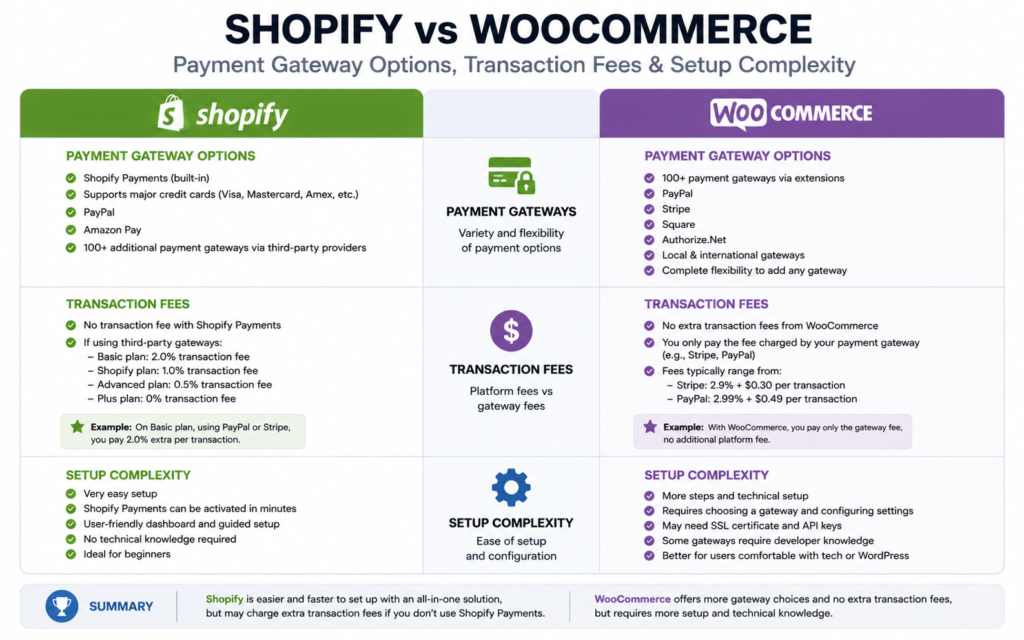
Both Shopify and WooCommerce support a wide range of payment options, but they differ in setup, flexibility, and transaction fees.
Shopify Payment Gateways
Shopify makes accepting payments simple by offering Shopify Payments, its built-in payment processing solution. With Shopify Payments, store owners can start accepting credit cards and other payment methods without needing to set up a third-party provider.
In addition to Shopify Payments, Shopify supports over 100 third-party payment gateways, including:
- PayPal
- Stripe
- Amazon Pay
- Apple Pay
- Google Pay
- Authorize.net
- Klarna
The setup process is straightforward and can usually be completed in just a few minutes. This makes Shopify particularly attractive for beginners who want to start selling quickly.
One thing to note is that Shopify may charge additional transaction fees if you choose a payment gateway other than Shopify Payments.
Benefits of Shopify Payment Gateways:
- Easy setup process
- Built-in Shopify Payments
- Supports multiple payment methods
- Secure checkout system
- Beginner-friendly interface
WooCommerce Payment Gateways
WooCommerce provides excellent flexibility when it comes to payment processing. Since it is an open-source platform, you can integrate with hundreds of payment gateways through plugins and extensions.
Popular WooCommerce payment options include:
- PayPal
- Stripe
- Square
- Authorize.net
- Amazon Pay
- Apple Pay
- Google Pay
- Local and regional payment providers
Unlike Shopify, WooCommerce does not charge additional platform transaction fees. However, you will still pay the standard processing fees charged by your payment provider.
The tradeoff is that setup may require installing plugins and configuring payment gateway settings manually, which can be slightly more challenging for beginners.
Benefits of WooCommerce Payment Gateways:
- No platform transaction fees
- Extensive gateway selection
- Greater flexibility
- Support for local payment providers
- Full control over payment processing
Payment Flexibility and Global Selling
In the Shopify VS WooCommerce For Beginners comparison, both platforms support international sales and multiple currencies. However, WooCommerce generally offers more flexibility because of its open-source nature and access to a larger ecosystem of payment plugins.
Shopify focuses on simplicity and reliability, making it easier for beginners to accept payments without technical setup. WooCommerce gives users more freedom to choose providers and customize the checkout experience.
Which Platform Is Better for Payment Processing?
For most beginners, Shopify offers the easier experience. The built-in Shopify Payments solution reduces setup time and simplifies payment management.
WooCommerce is often the better option for store owners who want complete control over their payment providers or need support for specific regional gateways that may not be available through Shopify.
When evaluating Shopify VS WooCommerce For Beginners, Shopify stands out for its simple setup and built-in payment processing tools, making it ideal for first-time store owners. WooCommerce offers greater flexibility and avoids additional platform transaction fees, making it attractive for users who want more control over their payment infrastructure. The best choice depends on whether you prioritize convenience or customization.
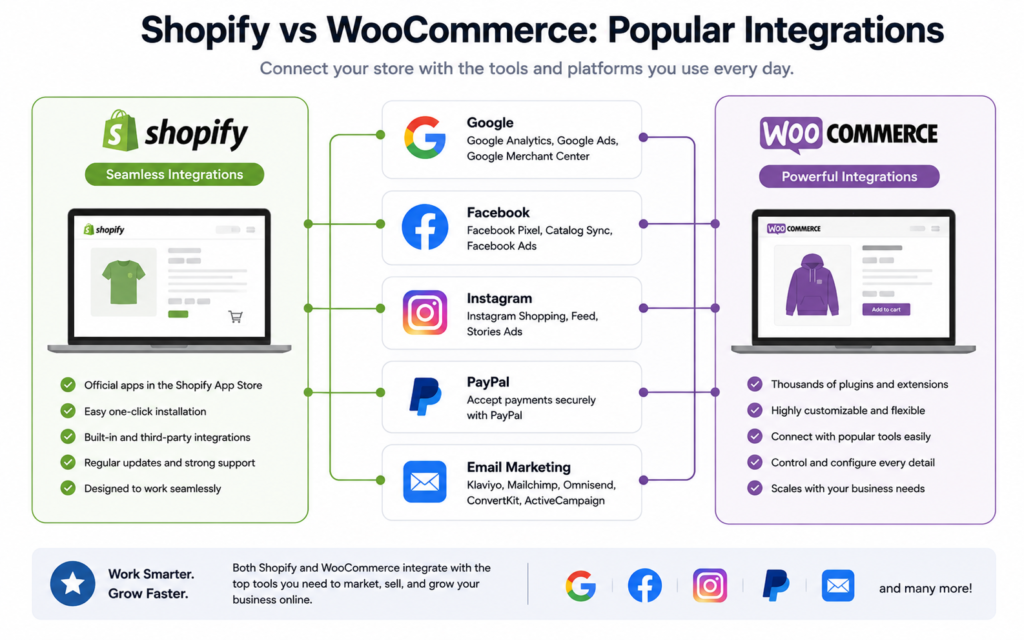
Apps, Plugins, and Integrations for Shopify VS WooCommerce For Beginners
When comparing Shopify VS WooCommerce For Beginners, apps, plugins, and integrations play a major role in determining how much functionality you can add to your online store. While both platforms allow you to extend your store’s capabilities, they do so in different ways.
Shopify Apps and Integrations
Shopify has a dedicated App Store that contains thousands of apps designed to enhance your store. Whether you want to improve SEO, automate email marketing, add customer reviews, launch a dropshipping business, or increase conversions, there is likely an app available.
One of Shopify’s biggest advantages is ease of use. Most apps can be installed with just a few clicks and require little to no technical knowledge. This makes it easy for beginners to add new features without worrying about complex configurations.
Popular Shopify app categories include:
- Email marketing
- Customer reviews
- Dropshipping
- SEO optimization
- Upselling and cross-selling
- Live chat
- Analytics and reporting
- Loyalty and rewards programs
However, many Shopify apps require monthly subscriptions, which can increase your overall store costs over time.
WooCommerce Plugins and Integrations
WooCommerce relies on WordPress plugins and extensions to add new functionality. Because WordPress powers a large portion of the internet, WooCommerce users have access to tens of thousands of plugins.
This gives store owners incredible flexibility. You can integrate almost any feature imaginable, from advanced SEO tools and membership systems to custom checkout experiences and marketing automation platforms.
Many plugins are available for free, which can help reduce costs. However, beginners may need to spend more time researching compatible plugins and configuring them correctly.
Popular WooCommerce plugin categories include:
- SEO tools
- Payment gateways
- Security plugins
- Email marketing integrations
- Product filters
- Membership systems
- Subscription services
- Performance optimization
Third-Party Integrations
In the Shopify VS WooCommerce For Beginners comparison, both platforms support integrations with major business tools and services.
Shopify integrates seamlessly with:
- Facebook and Instagram Shops
- Google Shopping
- TikTok
- Amazon
- Email marketing platforms
- Accounting software
- CRM systems
WooCommerce supports these integrations as well, but setup may require additional plugins or manual configuration.
For beginners, Shopify’s integration process is generally simpler, while WooCommerce offers more customization options for advanced users.
Which Platform Offers Better Flexibility?
Shopify focuses on convenience and ease of use. Most apps are easy to install, well-supported, and designed specifically for ecommerce stores.
WooCommerce offers greater flexibility because of the massive WordPress ecosystem. Users can customize nearly every aspect of their store, but this often comes with a steeper learning curve.
For beginners who value simplicity, Shopify’s app ecosystem is easier to navigate. For users who want unlimited customization and access to a larger library of tools, WooCommerce provides more flexibility.
When evaluating Shopify VS WooCommerce For Beginners, Shopify provides a more beginner-friendly experience with easy-to-install apps and streamlined integrations. WooCommerce offers a larger selection of plugins and greater customization potential, making it ideal for users who want more control over their store’s functionality. The right choice depends on whether you prioritize simplicity or flexibility.
SEO Comparison
When comparing Shopify VS WooCommerce For Beginners, SEO (Search Engine Optimization) is a critical factor to consider. SEO helps your online store rank higher in search engines like Google, making it easier for potential customers to find your products.
Both Shopify and WooCommerce offer solid SEO capabilities, but they differ in terms of flexibility, customization, and ease of use.
Shopify SEO Features
Shopify comes with several built-in SEO features that make it easy for beginners to optimize their online stores. You can edit page titles, meta descriptions, image alt text, and URLs without installing additional tools.
Shopify also automatically generates XML sitemaps, handles SSL certificates, and provides mobile-friendly themes, all of which contribute to better search engine rankings.
However, Shopify has some limitations when it comes to advanced SEO customization. For example, URL structures are partially fixed, which means you have less control compared to WooCommerce.
Key Shopify SEO Features:
- Custom title tags and meta descriptions
- Automatic XML sitemap generation
- Mobile-responsive themes
- SSL certificate included
- Fast page loading speeds
- Built-in blogging functionality
WooCommerce SEO Features
WooCommerce is widely considered one of the most SEO-friendly ecommerce platforms because it runs on WordPress. With WooCommerce, users have complete control over their site’s SEO settings and can use powerful SEO plugins like Rank Math, Yoast SEO, or All in One SEO.
This flexibility allows store owners to optimize every aspect of their website, including URLs, schema markup, redirects, breadcrumbs, category pages, and more.
Because WordPress was originally built for content publishing, WooCommerce also excels at content marketing and blogging, which can help drive additional organic traffic.
Key WooCommerce SEO Features:
- Complete control over URL structure
- Advanced SEO plugins available
- Custom schema markup options
- Better content marketing capabilities
- Flexible site architecture
- Enhanced technical SEO control
Blogging and Content Marketing
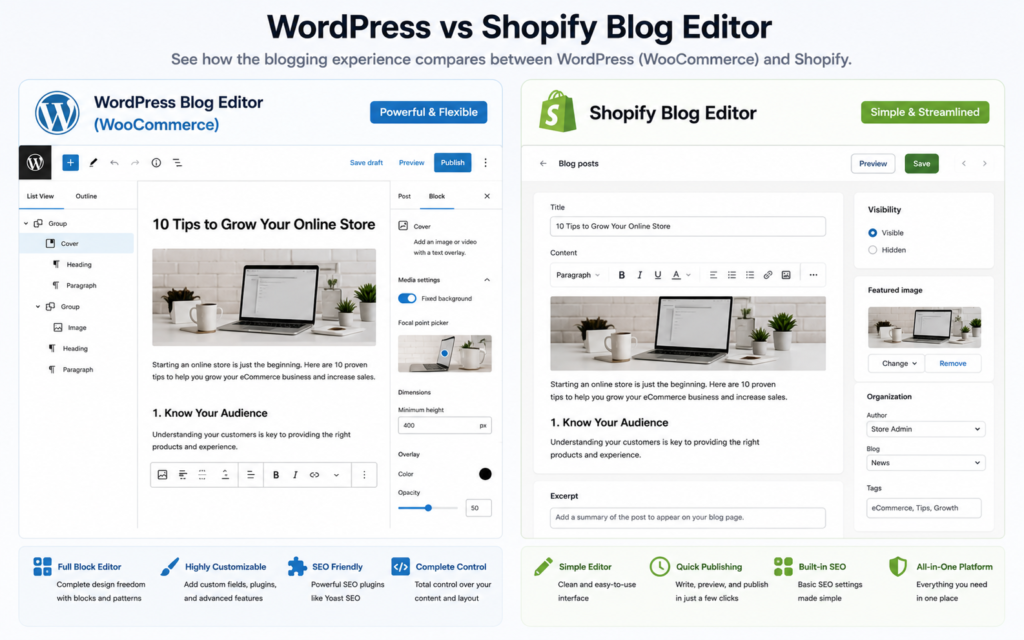
One area where WooCommerce has a clear advantage in the Shopify VS WooCommerce For Beginners comparison is content marketing.
Since WooCommerce is built on WordPress, it benefits from one of the most powerful blogging platforms available. Creating SEO-focused blog posts, pillar content, and internal linking structures is generally easier with WordPress.
Shopify includes a blogging feature, but it is more basic and lacks some of the advanced content management capabilities found in WordPress.
For affiliate marketers, content creators, and businesses that rely heavily on SEO traffic, WooCommerce often provides greater long-term opportunities.
Which Platform Is Better for SEO?
For beginners, Shopify offers a simple and user-friendly SEO experience. Most essential SEO settings are built in, and the platform handles many technical tasks automatically.
WooCommerce provides more advanced SEO capabilities and greater flexibility. However, it may require additional plugins and a deeper understanding of SEO best practices to take full advantage of its features.
Bottom Line
When evaluating Shopify VS WooCommerce For Beginners, Shopify is ideal for users who want a straightforward SEO setup with minimal technical work. WooCommerce is the better choice for users who want complete SEO control, advanced optimization options, and stronger content marketing capabilities. While both platforms can rank well in search engines, WooCommerce offers greater SEO flexibility, while Shopify provides a simpler path for beginners.
Security and Maintenance
When considering Shopify VS WooCommerce For Beginners, security and maintenance are important factors that can affect both your store’s performance and your peace of mind. An online store handles sensitive customer information, payment data, and business transactions, so choosing a secure platform is essential.
Both Shopify and WooCommerce can provide a secure ecommerce environment, but they differ significantly in how security and maintenance are managed.
Shopify Security and Maintenance
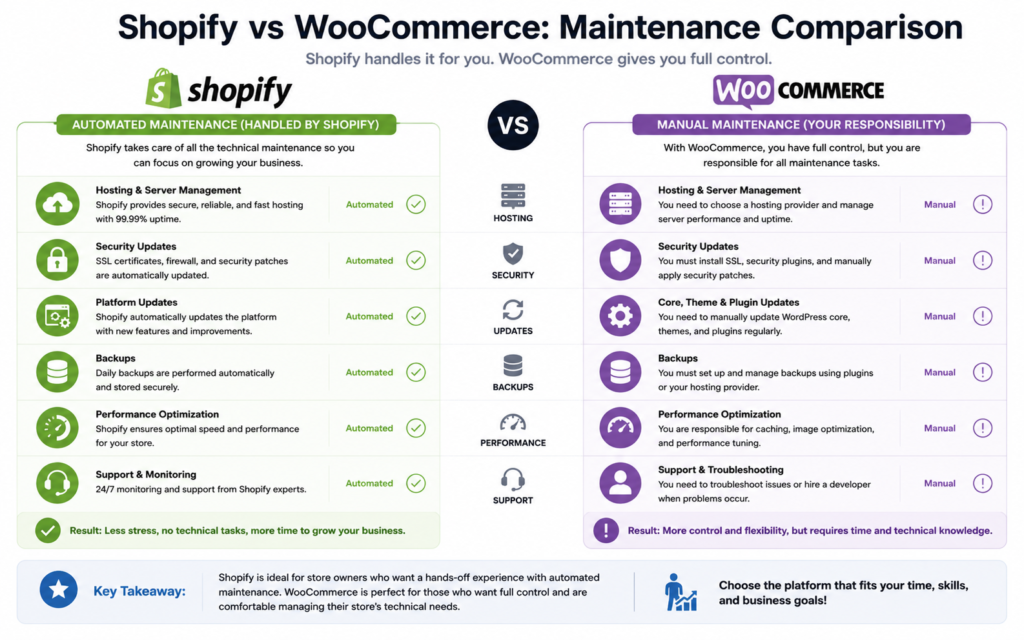
Shopify is a fully hosted ecommerce platform, which means Shopify handles most security and maintenance tasks for you. This is one of the biggest advantages for beginners.
The platform automatically takes care of software updates, security patches, server maintenance, and performance optimization. Shopify also includes an SSL certificate with every store, helping protect customer data and build trust with shoppers.
Additionally, Shopify is PCI DSS compliant, meaning it meets industry standards for securely processing credit card payments.
Key Shopify Security Features:
- Free SSL certificate
- PCI DSS compliance
- Automatic software updates
- Built-in fraud analysis tools
- Secure hosting environment
- Automatic backups and maintenance
Because Shopify manages these tasks behind the scenes, store owners can focus on running their business rather than handling technical issues.
WooCommerce Security and Maintenance
WooCommerce can be just as secure as Shopify, but security responsibilities fall largely on the store owner.
Since WooCommerce is self-hosted, you’ll need to manage software updates, security plugins, backups, hosting security, and performance optimization. The level of security often depends on your hosting provider and the steps you take to protect your website.
Most WooCommerce store owners use additional security plugins to strengthen protection against malware, hacking attempts, and spam attacks.
Common WooCommerce security tools include:
- Wordfence Security
- Sucuri Security
- UpdraftPlus for backups
- SSL certificates
- Firewall protection
While this approach provides greater control, it also requires more time and technical knowledge.
Key WooCommerce Security Features:
- Full control over security settings
- Flexible security plugin options
- Custom backup solutions
- Choice of secure hosting providers
- Ability to implement advanced security measures
Maintenance Requirements
In the Shopify VS WooCommerce For Beginners comparison, maintenance is where the biggest difference becomes apparent.
With Shopify, updates, server management, and technical maintenance happen automatically. Users rarely need to worry about keeping the platform updated.
With WooCommerce, regular maintenance is required. This includes:
- Updating WordPress
- Updating WooCommerce
- Updating plugins and themes
- Performing backups
- Monitoring website security
- Troubleshooting plugin conflicts
For beginners, these tasks can sometimes feel overwhelming, especially as the store grows.
Which Platform Is More Secure?
Both platforms can be highly secure when properly managed. Shopify provides a more hands-off approach, making it ideal for beginners who want security and maintenance handled automatically.
WooCommerce offers greater control over security settings but requires more active management and responsibility from the store owner.
When evaluating Shopify VS WooCommerce For Beginners, Shopify is the clear winner for ease of security and maintenance. Its fully managed infrastructure, automatic updates, and built-in security features make it an excellent choice for users with little technical experience. WooCommerce offers more flexibility and control but requires ongoing maintenance and security management. For most beginners, Shopify provides a safer and less stressful experience, while WooCommerce is better suited for users who are comfortable managing their own website infrastructure.
Customer Support
Customer support is an important factor to consider. No matter how easy a platform is to use, there may be times when you need help with setup, troubleshooting, or managing your online store.
The level of support available can make a big difference, especially for beginners who may not have technical experience.
Shopify Customer Support
One of Shopify’s biggest advantages is its dedicated customer support team. Since Shopify is a fully hosted platform, users have access to direct support whenever they need assistance.
Shopify offers support through multiple channels, including:
- 24/7 live chat
- Email support
- Help Center articles
- Video tutorials
- Community forums
- Shopify Academy training resources
Because Shopify controls the entire platform, support agents can usually help with most store-related issues, including payments, themes, apps, and technical problems.
This makes Shopify particularly appealing to beginners who want reliable assistance when something goes wrong.
Benefits of Shopify Support:
- 24/7 customer service
- Multiple support channels
- Beginner-friendly documentation
- Large knowledge base
- Dedicated platform experts
WooCommerce Customer Support
WooCommerce takes a different approach to support because it is an open-source platform built on WordPress.
There is no centralized WooCommerce support team that handles every issue. Instead, support often depends on the specific product, plugin, theme, or hosting provider you are using.
WooCommerce users can find help through:
- WooCommerce documentation
- WordPress community forums
- Plugin developer support
- Theme developer support
- Hosting provider support
- Online tutorials and guides
While the WooCommerce community is large and active, beginners may sometimes find it challenging to determine where to seek help when problems arise.
For example, if an issue involves your hosting provider, payment gateway plugin, or theme, you may need to contact different support teams.
Benefits of WooCommerce Support:
- Large user community
- Extensive documentation
- Support from plugin and theme developers
- Huge library of tutorials and guides
- Strong WordPress ecosystem
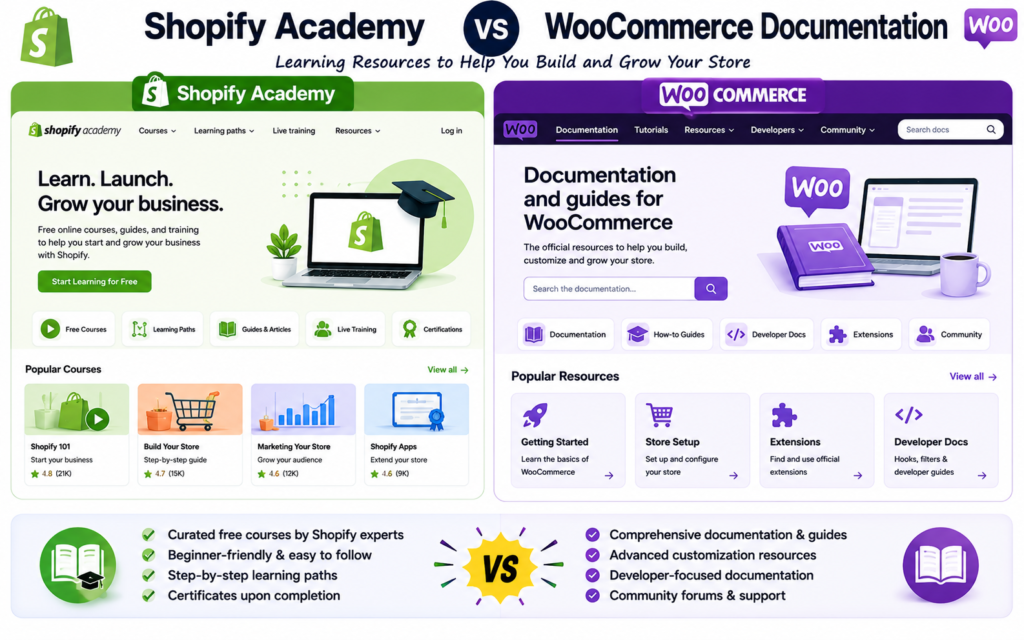
Learning Resources and Community Support
In the Shopify VS WooCommerce For Beginners comparison, both platforms offer plenty of educational resources.
Shopify provides structured learning through Shopify Academy, official guides, webinars, and tutorials designed specifically for ecommerce store owners.
WooCommerce benefits from the massive WordPress community, giving users access to countless blogs, YouTube tutorials, courses, and discussion forums.
While both platforms have strong learning resources, Shopify’s materials are generally more organized and beginner-focused.
Which Platform Offers Better Support?
For beginners, Shopify clearly has the advantage when it comes to customer support. Having direct access to a dedicated support team can save time and reduce frustration when technical issues occur.
WooCommerce offers excellent community support and documentation, but finding the right solution often requires more research and troubleshooting.
When evaluating Shopify VS WooCommerce For Beginners, Shopify provides the better customer support experience thanks to its 24/7 assistance, centralized support system, and beginner-friendly resources. WooCommerce offers a wealth of documentation and community knowledge, but support is often decentralized and may require users to contact multiple providers for help. For beginners who value fast and reliable assistance, Shopify is generally the stronger choice.
Scalability
When comparing Shopify VS WooCommerce For Beginners, scalability is an important factor to consider. While your store may start small, you’ll want a platform that can grow with your business as traffic, products, and sales increase.
Both Shopify and WooCommerce can support growing ecommerce businesses, but they handle scalability in different ways.
Shopify Scalability
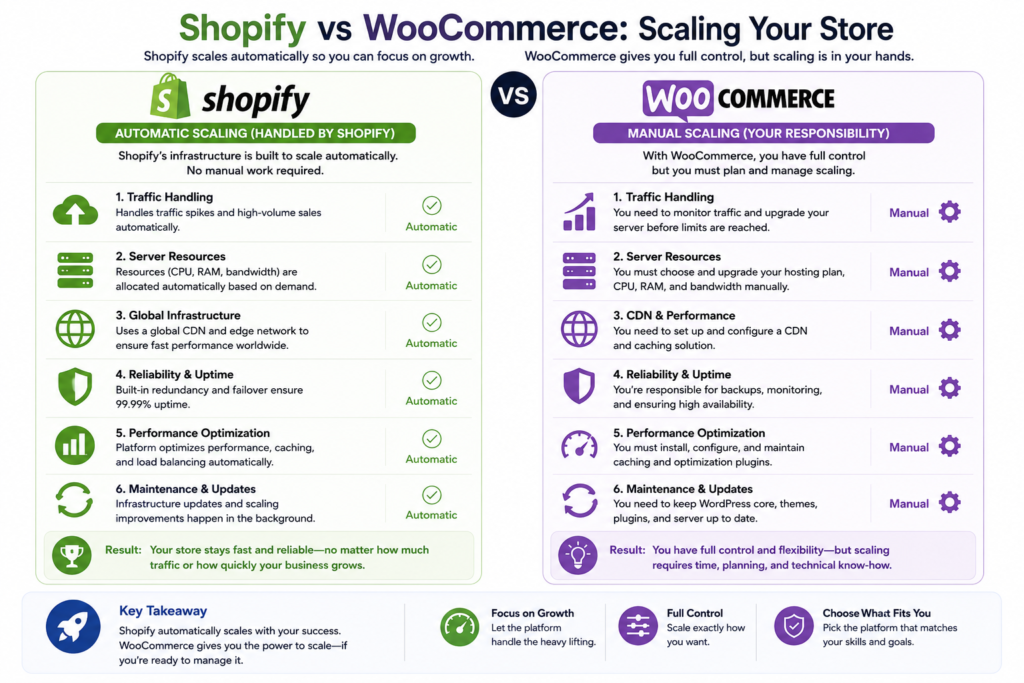
Shopify is designed to scale automatically as your business grows. Since it is a hosted platform, Shopify manages the technical infrastructure behind your store, including servers, security, performance, and uptime.
As your traffic increases, Shopify handles the additional load without requiring you to upgrade servers or manage technical settings. This makes it an attractive option for beginners who want to focus on sales and marketing rather than website management.
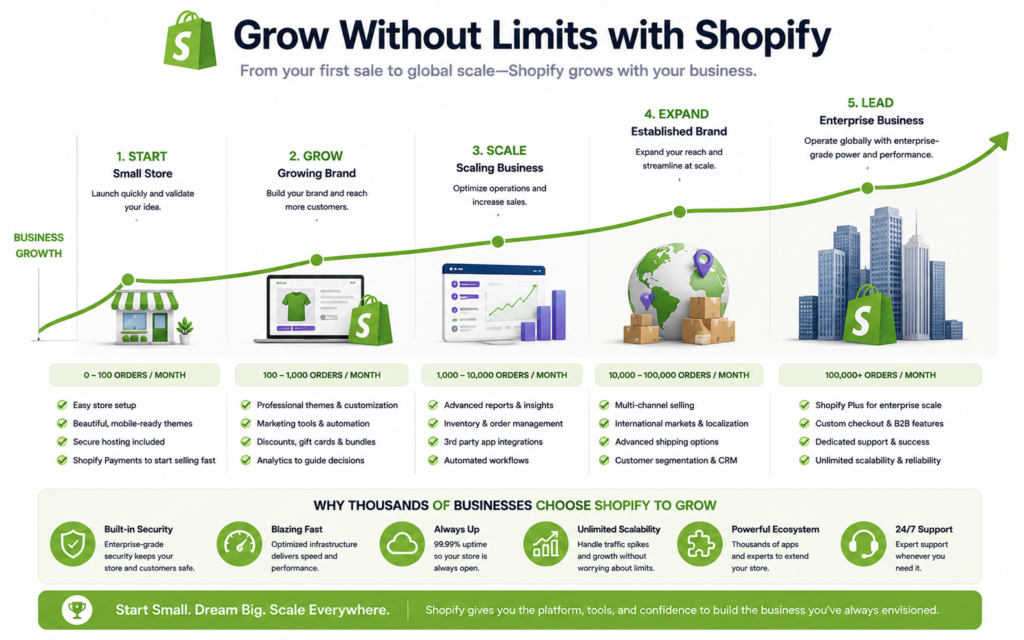
Shopify also offers higher-tier plans and Shopify Plus for larger businesses that need advanced features and enterprise-level performance.
Benefits of Shopify Scalability:
- Automatic performance management
- No server maintenance required
- Handles traffic spikes efficiently
- Reliable uptime and security
- Easy upgrades as your business grows
- Enterprise-level Shopify Plus option
WooCommerce Scalability
WooCommerce is also highly scalable, but scaling requires more hands-on management. Since WooCommerce is self-hosted, the platform’s performance depends largely on your hosting provider and website optimization.
As your store grows, you may need to:
- Upgrade your hosting plan
- Optimize database performance
- Use content delivery networks (CDNs)
- Implement caching solutions
- Monitor website speed and security
The advantage is that WooCommerce gives you complete control over your store’s infrastructure. Large businesses can build highly customized ecommerce websites with virtually unlimited functionality.
However, beginners may find the technical aspects of scaling more challenging.
Benefits of WooCommerce Scalability:
- Full control over hosting resources
- Unlimited customization potential
- Can support very large stores
- Flexible server and infrastructure choices
- No platform-imposed limitations
Performance at Scale
In the Shopify VS WooCommerce For Beginners comparison, Shopify generally offers the easier path to scalability. The platform automatically manages performance optimization and infrastructure upgrades behind the scenes.
WooCommerce can achieve excellent performance as well, but success depends on choosing quality hosting and maintaining the website properly. Poor hosting or outdated plugins can impact performance as traffic grows.
For beginners, Shopify’s managed approach often removes much of the stress associated with scaling an online store.
Which Platform Is Better for Long-Term Growth?
Both Shopify and WooCommerce can support businesses ranging from small startups to large ecommerce brands.
- Shopify is ideal for users who want hassle-free growth and minimal technical management.
- WooCommerce is better suited for users who want complete control over their website and are comfortable managing hosting and performance upgrades.
Both platforms offer excellent scalability. Shopify provides a more beginner-friendly experience by automatically handling performance, security, and infrastructure as your business grows. WooCommerce offers greater flexibility and control but requires more active management to maintain performance at scale. For most beginners, Shopify offers the simpler path to growth, while WooCommerce is better for those who want maximum customization and control over their store’s long-term development.
Shopify vs WooCommerce: Pros and Cons
When comparing Shopify VS WooCommerce For Beginners, it helps to look at the main pros and cons of each platform. Both Shopify and WooCommerce are powerful ecommerce solutions, but they are built for different types of users.
Shopify Pros
Shopify is a great option for beginners who want a simple, all-in-one ecommerce platform. It includes hosting, security, payment tools, themes, and support in one place.
Main Shopify pros:
- Easy to set up and use
- Hosting and security included
- 24/7 customer support
- Built-in payment processing
- Professional ecommerce themes
- App store for extra features
- Less technical maintenance required
Shopify is especially useful for beginners who want to launch an online store quickly without dealing with hosting, plugins, or website maintenance.
Shopify Cons
While Shopify is easy to use, it does come with some limitations. Since it is a hosted platform, users have less control over certain parts of their store compared to WooCommerce.
Main Shopify cons:
- Monthly subscription required
- Some apps can increase costs
- Less control over advanced customization
- Transaction fees may apply when not using Shopify Payments
- Limited control over some SEO and URL settings
For beginners, these drawbacks may not be a major issue at first. However, they can become more important as your store grows and your customization needs increase.
WooCommerce Pros
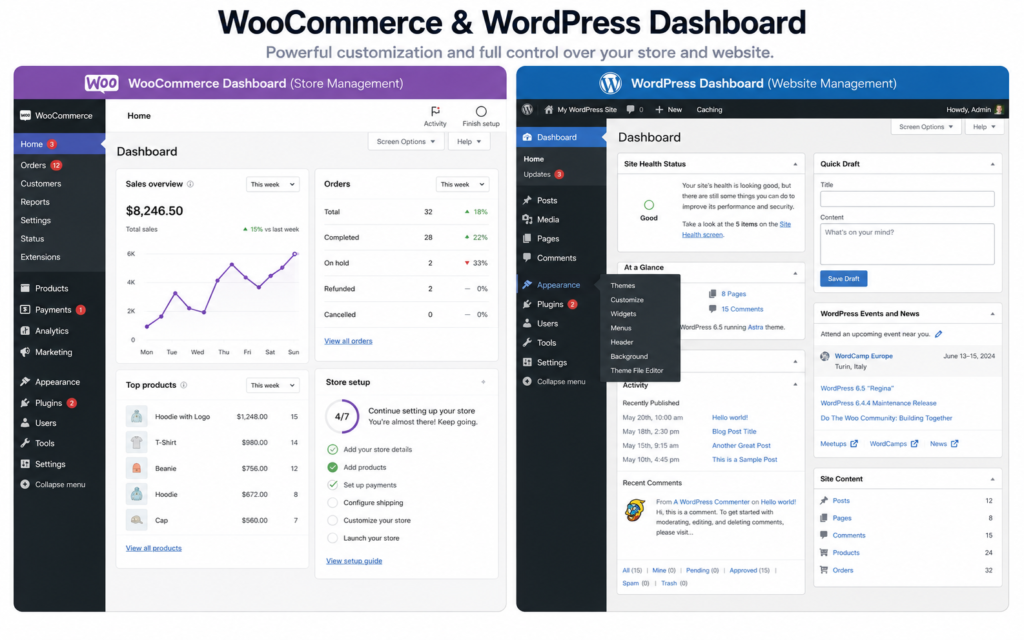
WooCommerce is a strong choice for users who want more flexibility and control. Since it runs on WordPress, it gives store owners access to thousands of themes, plugins, and customization options.
Main WooCommerce pros:
- Free plugin to install
- Full control over your website
- Highly customizable
- Large selection of themes and plugins
- Strong SEO capabilities
- No platform transaction fees
- Great for content marketing and blogging
In the Shopify VS WooCommerce For Beginners comparison, WooCommerce is best for users who are comfortable learning WordPress or want more freedom to build a customized store.
WooCommerce Cons
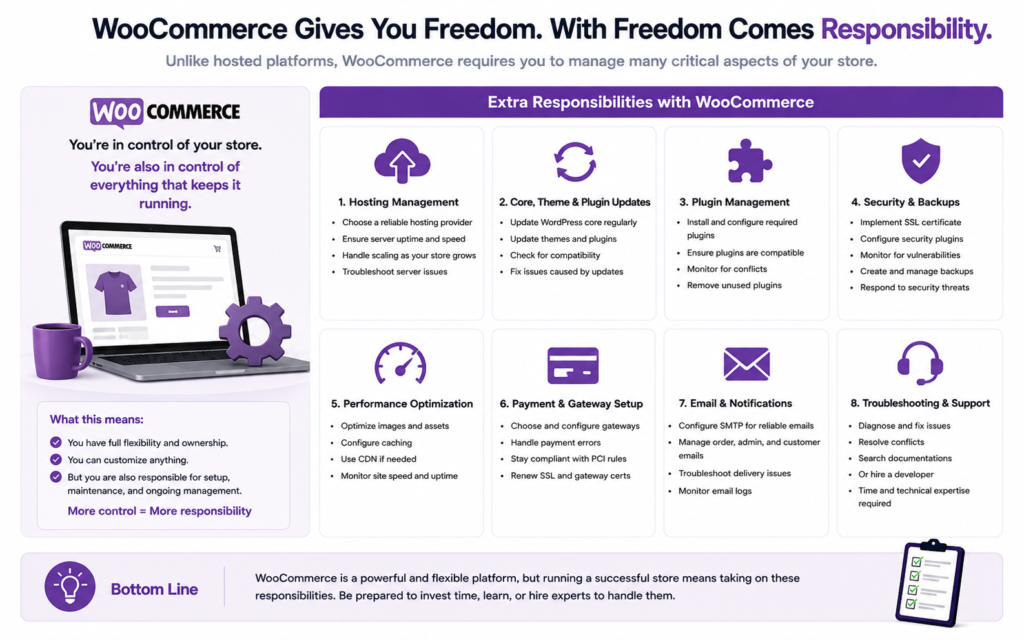
WooCommerce offers more control, but it also requires more responsibility. Beginners need to manage hosting, security, backups, updates, and plugins.
Main WooCommerce cons:
- More technical setup required
- Hosting must be purchased separately
- Security and backups are your responsibility
- Plugin conflicts can happen
- Support is less centralized
- Costs can increase with premium plugins and developer help
WooCommerce can be powerful, but it may feel overwhelming for complete beginners who want a simple setup process.
Which Platform Has Better Pros for Beginners?
For most beginners, Shopify has the stronger advantages because it is easier to set up, easier to manage, and requires less technical knowledge. It gives users the tools they need to start selling without worrying about website maintenance.
WooCommerce has stronger advantages for users who want full control, advanced SEO, and deep customization. However, it requires more time and technical effort.
Shopify is the better choice for users who want simplicity, support, and a faster setup process. WooCommerce is better for users who want flexibility, control, and long-term customization options.
Both platforms can help you build a successful online store. The right choice depends on whether you value ease of use or complete control.
Who Should Choose Shopify?
When comparing Shopify VS WooCommerce For Beginners, Shopify is often the preferred choice for users who want a simple and hassle-free way to start an online store. Because Shopify handles hosting, security, updates, and maintenance, it allows store owners to focus on growing their business instead of managing technical tasks.
If you’re new to ecommerce and want to launch your store as quickly as possible, Shopify is likely the better option.
Shopify Is Best For Beginners
One of the biggest reasons people choose Shopify is its ease of use. The platform is designed for users with little to no technical experience. Everything from setting up products to accepting payments can be done through a user-friendly dashboard.
If you’re looking for a platform that requires minimal setup and maintenance, Shopify is an excellent choice.
Shopify Is Ideal for Business Owners Who Want an All-in-One Solution
Shopify combines hosting, security, payment processing, themes, and customer support into one package. This eliminates the need to manage multiple services and providers.
You may benefit from Shopify if you:
- Want a complete ecommerce solution
- Prefer predictable monthly costs
- Don’t want to manage hosting or security
- Need access to dedicated customer support
- Want to launch quickly
For many users researching Shopify VS WooCommerce For Beginners, this all-in-one approach is one of Shopify’s biggest advantages.
Shopify Is Great for Fast-Growing Stores
Shopify is built to scale as your business grows. Whether you’re selling a few products or managing thousands of orders per month, Shopify can handle increasing traffic and sales without requiring major technical changes.
Business owners who expect rapid growth often appreciate Shopify’s ability to manage performance and security automatically.
Shopify is especially suitable for:
- Dropshipping businesses
- Small business owners
- New ecommerce entrepreneurs
- Brands focused on marketing and sales
- Businesses that want minimal technical management
Shopify May Not Be the Best Choice If…
While Shopify is an excellent platform for many users, it may not be ideal for everyone.
You may want to consider WooCommerce instead if you:
- Need complete control over your website
- Want advanced customization options
- Have experience with WordPress
- Prefer avoiding monthly platform fees
- Need highly specialized functionality
In the Shopify VS WooCommerce For Beginners comparison, Shopify prioritizes simplicity, while WooCommerce prioritizes flexibility.
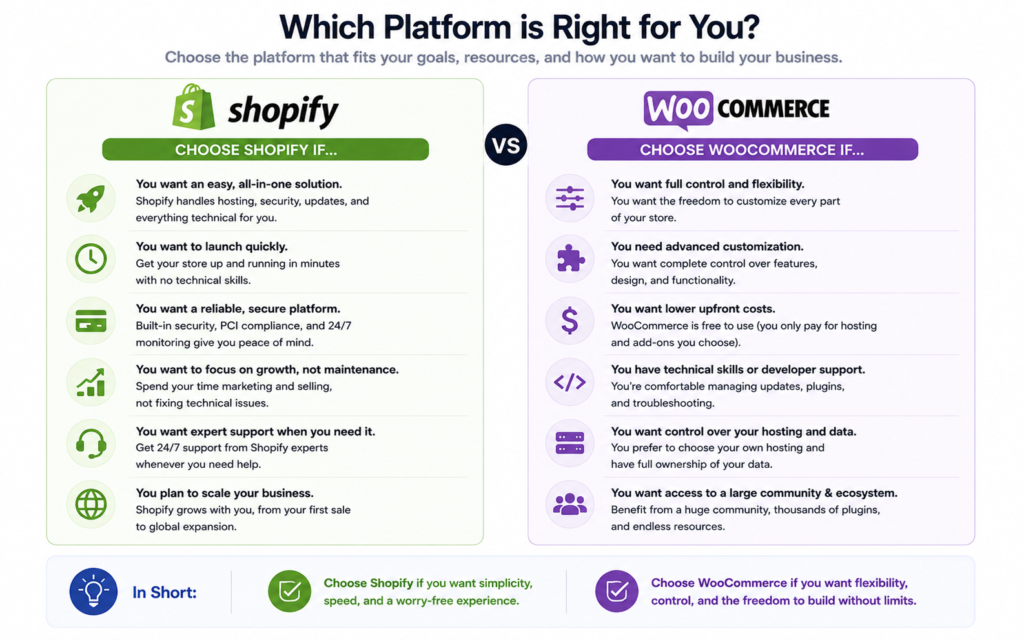
Shopify is the best choice for users who want an easy-to-use, fully managed ecommerce platform. It is ideal for beginners, small business owners, and entrepreneurs who want to focus on selling products rather than managing website technology.
If convenience, support, security, and ease of use are your top priorities, Shopify is likely the right platform for your online store.
Who Should Choose WooCommerce?
When comparing Shopify VS WooCommerce For Beginners, WooCommerce is the better choice for users who want maximum control, flexibility, and customization. While it requires more setup and maintenance than Shopify, it offers nearly unlimited possibilities for building and growing an online store.
WooCommerce is ideal for users who are comfortable learning new tools or who want complete ownership of their website and ecommerce platform.
WooCommerce Is Best for Users Who Want Full Control
One of WooCommerce’s biggest advantages is that it is open-source software. This means you have complete control over your store’s design, functionality, hosting, and data.
Unlike Shopify, which operates within a managed ecosystem, WooCommerce allows you to customize almost every aspect of your website.
WooCommerce is a good choice if you want to:
- Fully customize your online store
- Choose your own hosting provider
- Control every aspect of your website
- Modify code and functionality
- Avoid platform restrictions
For users who value flexibility, WooCommerce has a clear advantage in the Shopify VS WooCommerce For Beginners comparison.
WooCommerce Is Ideal for WordPress Users
If you already use WordPress or are familiar with the platform, WooCommerce can feel like a natural extension of your website.
Since WooCommerce is built specifically for WordPress, you can combine ecommerce functionality with powerful content marketing, blogging, and SEO capabilities.
This makes WooCommerce particularly attractive for:
- Bloggers
- Affiliate marketers
- Content creators
- SEO-focused businesses
- Website owners already using WordPress
For businesses that rely heavily on organic search traffic, WooCommerce’s integration with WordPress can be a significant advantage.
WooCommerce Is Great for Advanced Customization
Many business owners choose WooCommerce because of its flexibility. With thousands of themes, plugins, and integrations available, you can create a highly customized online store tailored to your specific needs.
WooCommerce works well for businesses that need:
- Custom checkout experiences
- Membership sites
- Subscription products
- Wholesale functionality
- Advanced SEO optimization
- Unique design requirements
As your business grows, WooCommerce gives you the freedom to expand without being limited by platform restrictions.
WooCommerce May Not Be the Best Choice If…
Although WooCommerce is powerful, it isn’t always the best option for beginners.
You may want to choose Shopify instead if you:
- Want the easiest setup process
- Prefer an all-in-one solution
- Don’t want to manage hosting or security
- Need dedicated customer support
- Have limited technical experience
In the Shopify VS WooCommerce For Beginners debate, WooCommerce offers more control, but it also comes with greater responsibility.
When evaluating Shopify VS WooCommerce For Beginners, WooCommerce is the best choice for users who want complete control, advanced customization, and the flexibility to build a highly tailored ecommerce website. It is especially well-suited for WordPress users, bloggers, and businesses that rely on SEO and content marketing.
If you’re willing to spend more time managing your website in exchange for greater freedom and customization, WooCommerce can be an excellent long-term solution for your online store.
Conclusion for Shopify VS WooCommerce For Beginners
The best choice between Shopify VS WooCommerce For Beginners, depends on your goals, budget, and technical comfort level.
Shopify is the better option if you want a simple, all-in-one ecommerce platform that handles hosting, security, updates, payments, and support for you. It is ideal for beginners who want to launch quickly and avoid technical tasks.
WooCommerce is the better choice if you want full control, advanced customization, and stronger flexibility through WordPress. It may take more time to set up and manage, but it gives you more freedom over your website and long-term growth.
Overall, Shopify is best for beginners who value ease of use, while WooCommerce is best for users who want control and customization. Both platforms can help you build a successful online store, but the right choice depends on how much simplicity or flexibility you need.